whatsapppopupnewiconGUIDE ME
Tosca Online Course

Tosca Online Training in India

Our Tosca Course is designed to help students, QA professionals, and IT aspirants build strong skills in test automation using Tricentis Tosca. From model-based automation and UI/API testing to real-time project scenarios — learn with hands-on practice.
Duration 6–12 Weeks | Mode: Live + Recorded Sessions

Check Tosca Demo Class

Check our Tosca Demo Class to experience real-time training before you enroll.

Our Recently Placed Students in Tosca Training

Ravi Verma

Placed at Tech Mahindra

Arjun Mehta

Placed at HCL

Swati Mishra

Placed at Wipro

Keshav Kumar

Placed at Traviyo

Neha Gupta

Placed at Capgemini

Rohan

Placed at Accenture

Anuj Yadav

Placed at Infosys

Swati Sharma

Placed at TCS
Tosca Online Course

About the Tosca Online Course

Our Tosca Training is designed to help you gain both functional and technical skills required to work on real-time test automation projects. This Tosca course explains how end-to-end application testing is performed using Tricentis Tosca and prepares you to work as a Tosca Automation Engineer in enterprise environments.

Training Highlights
  • Live classes with instructors
  • Hands-on access to Tosca Commander
  • Model-Based Test Automation (MBTA)
  • API testing using Tosca API Engine
  • Integrate with Jira, Jenkins & Azure DevOps
  • Real project practice & interview preparation
  • Placement support

What you get

  • Live classes + recorded videos
  • Tosca sandbox for practice
  • Complete project work
  • Interview preparation

Course Design & Approved By

Nasscom & Wipro

What You Will Learn in Tosca Online Training

Our Tosca Online Training teaches all important modules step-by-step.

Core Modules

  • Introduction to Tosca
  • Commander & Architecture
  • Test Case Design
  • MBTA concepts
  • API Testing
  • Jira/ALM Integration

Advanced Topics

  • CI/CD with Jenkins
  • Distributed Execution
  • Custom Modules
  • Real project work

Download Curriculum

Get a peek through the entire curriculum designed that ensures Placement Guidance

Course Design By

nasco wp

Course Offered By

Why Choose Tosca Course Material & Resources?

  • Updated Tosca Training materials
  • Project-based practice
  • Interview questions by experts
  • Study Notes
  • Easy Modules

Benefits of Enrolling in Our Tosca Training

  • Hands-on Learning
  • Instructor-Led Sessions
  • Placement Assistance
  • Lifetime Course Access
  • Real-Time Tools Training
Learners Reviews

“I finished the Tosca online training and learned testing step by step. The teachers were good and supportive.”

— Raghav, QA Tester

“This Tosca course is very helpful. I now know how to do testing and prepare for interviews easily.”

— Vinay, QA Analyst

“I learned testing easily. The lessons were simple, and doing real projects helped me gain confidence for jobs.”

— Pooja, Software Tester

“The course taught me testing and API work. Sandbox practice and live classes made it simple to follow.”

— Suresh, Automation Test Engineer

“I liked the Tosca online training. The teacher explained everything clearly, and the projects helped me learn well.”

— Anjali, QA Engineer

“This Tosca course was easy to understand. I learned testing step by step and got hands-on practice with real projects.”

— Shiv, Tosca Automation Tester
Tosca – Country Wise Job Profiles & Salary Guide

Top Job Profiles:

  • Tosca Automation Engineer
  • Tosca Test Engineer
  • QA Automation Engineer (Tosca)
  • Tosca Functional Tester
  • Test Automation Consultant

Average Salary Range:

  • INR 4 LPA - INR 7 LPA (Entry Level)
  • INR 8 LPA - INR 15 LPA (Mid-Level)
  • INR 16 LPA - INR 28+ LPA (Senior / Specialist)

Top Job Profiles:

  • Tosca Automation Engineer
  • Senior QA Automation Engineer
  • Test Automation Architect
  • Tosca Consultant

Average Salary Range:

  • $75,000 - $95,000 (Entry Level)
  • $100,000 - $125,000 (Mid-Level)
  • $130,000 - $ 155,000+ (Senior Level)

Top Job Profiles:

  • Tosca Automation Tester
  • QA Automation Specialist
  • Test Automation Engineer

Average Salary Range:

  • CAD 65,000 - CAD 80,000 (Entry Level)
  • CAD 85,000 - CAD 105,000 (Mid-Level)
  • CAD 110,000 - CAD 135,000+ (Senior Level)

Top Job Profiles:

  • Tosca Test Engineer
  • QA Automation Consultant
  • Senior Automation Tester

Average Salary Range:

  • £40,000 - £55,000 (Entry Level)
  • £60,000 - £75,000 (Mid-Level)
  • £80,000 - £95,000+ (Senior Level)

Top Job Profiles:

  • Tosca Automation Engineer
  • Test Automation Specialist
  • QA Engineer (Tosca)

Average Salary Range:

  • EUR 55,000 - EUR 70,000 (Entry Level)
  • EUR 75,000 - EUR 90,000 (Mid-Level)
  • EUR 95,000 - EUR 115,000+ (Senior Level)

Enroll Today

Start your career in Test Automation with industry-focused Tosca Course. Join Tosca Online Training and gain practical automation testing skills.

About the Trainer

Our trainers have 12+ years of experience in the field of test automation. They have worked on Tosca for big companies and trained over 2000 professionals. Expertise includes API testing, and CI/CD integrations
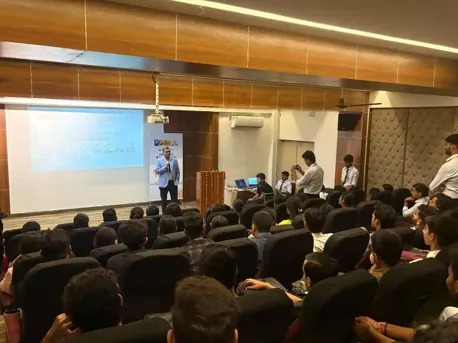
  • 12+ years of real-world experience
  • Worked with big companies on Tosca projects
  • Trained 2000+ professionals successfully
  • Expert in MBTA, API testing, CI/CD
  • Hands-on, easy-to-understand teaching style
  • Helps with real projects and interview prep
Frequently Asked Questions

Yes, you will practice on real projects to learn by doing.

Yes, API testing is taught, along with tools such as Jenkins and Azure DevOps.

Yes, it covers basic topics and then slowly moves to advanced ones.

Yes, you will do projects, exercises, and mock interviews for job readiness.

Yes, the course shows how to create reusable modules, libraries, and frameworks in Tosca.

Yes, hands-on API and database automation are a part of the course.

Yes, you will receive a Tosca Training Online certificate and instruction for official Tricentis certifications.

CURRICULUM & PROJECTS

Software Testing with Tosca Training Program

    Software Testing Fundamentals

    • Introduction
    • What is Software Testing
    • Why do we need Testing
    • How to perform the Testing
    • Benefits of Testing

    Software Testing Terminologies

    • Mistakes, Faults, Bugs & Failures
    • Priority & Severity
    • Debugging & Root Cause Analysis
    • Verification & Validation
    • Test Bed/Environment
    • Mock-ups
    • Test Scenario

    ISTQB Certification

    Quality Assurance & Quality Control

    • What is Quality Assurance
    • What is Quality Control
    • Quality Assurance vs Quality Control

    Software Testing as a Career

    • Best testing practices used in Software Industry
    • Software Tester Roles
    • Job Responsibilities of a Software Tester
    • Why choose Software Testing as a career
    • How training can help you to become a Software Tester

    SDLC & STLC

    • Software Development Life Cycle (SDLC)
    • Software Requirement and Analysis
    • Requirement Gathering
    • SRS Creation
    • Feasibility Study
    • Requirement Validation
    • SRS Approval
    • Project Kick-off
    • Application Walkthrough
    • Requirement Analysis

    Software Requirement Design

    • System Design
    • Architecture Design
    • Module Design
    • Coding/Development
    • Testing
    • Implementation/Live

    Software Testing Life Cycle (STLC)

    • Requirements Analysis
    • Test Planning
    • Test Development
    • Test Execution
    • Test Reporting
    • Test Result Analysis / Defect Analysis
    • Re-Testing
    • Regression Testing
    • Test Closure Report

    Software Testing Models

    • Waterfall Model
    • Iterative Model
    • Prototyping Model
    • Progressive Model
    • Spiral Model
    • V-Model
    • RAD (Rapid Application Development)
    • Agile

    Agile Methodology

    • Introduction to Agile
    • User Stories & Agile Testing
    • Agile Project Management

    Software Testing Methodology

    • White Box Testing
      • Path Testing
      • Loop Testing
      • Condition Testing
      • White box Testing from Memory Point of View
      • White box Testing from Performance Point of View
    • Grey Box Testing
    • Black Box Testing
      • Boundary Value Analysis.
      • Equivalence partitioning.
      • State Transition Testing.
      • Decision Table Testing.
      • Graph-Based Testing.
      • Error Guessing Technique
Get full course syllabus in your inbox

    Intro to Gen AI

    • What is Generative AI
    • How it differs from traditional software
    • Basic architecture (Prompt Model Output)
    • Terminology: prompt, hallucination, tokens, fine-tuning, context window.

    Gen AI Testing Fundamentals

    • Why testing Gen AI is different from traditional testing
    • Key challenges: Non-determinism, bias, hallucination
    • Evaluation approaches:
    • Golden set testing
    • Human-in-the-loop testing
    • A/B testing of model versions

    Functional Testing

    • How to verify Gen AI output correctness
    • Metrics: BLEU, ROUGE, Precision/Recall
    • Test scenarios: Prompt injection
    • Incomplete or ambiguous prompts
    • Multiple languages or accents
    • Response formatting & structure

    Non-Functional Testing

    • Security Testing: Prompt injection, data leaks
    • Performance: Latency, token limits
    • Ethical Testing: Biases, toxicity, inappropriate content
    • Robustness Testing: Noisy input, out-of-domain queries

    Prompt Engineering for Testers

    • What is prompt engineering
    • Prompt types: Zero-shot, few-shot, chain-of-thought
    • Testing prompts like code: assertions, expected outcomes
Get full course syllabus in your inbox

    Introduction

    • What is Database
    • What is Database Management System (DBMS)
    • What is Relational Model
    • Introduction to RDBMS

    Datatypes and Constraints

    • What are Datatypes
    • Types and Examples.
    • How to use.
    • What are Constraints
    • Types and Examples.
    • How to use.

    Statements in SQL

    • Data Definition Language (DDL)
    • Data Manipulation Language (DML)
    • Transaction Control Language (TCL)
    • Data Control Language (DCL)
    • Data Query Language (DQL)

    Software installation

    • Installing and set up of Software
    • Working on Database

    Data Query Language (DQL)

    • Select
    • From
    • Where
    • Group By
    • Having
    • Order By

    Operators

    • Types and Examples

    Functions in SQL

    • Single Row Functions
    • Multi Row Functions

    Sub Query

    • Introduction to Sub Query
    • Working of Sub Query
    • Query Writing and Execution
    • Types of Sub Query
    • 1. Single Row Sub Query
    • 2. Multi Row Sub Query
    • Nested Sub Query.

    JOINS

    • What Is Join
    • Types of Joins.
    • Cartesian Join
    • Inner Join
    • Outer Join
    • Self-Join
    • Queries and Examples.

    Co- Related Sub Query

    • Working and Examples

    Data Definition Language (DDL)

    • Create
    • Rename
    • Alter
    • Truncate
    • Drop

    Data Manipulation Language (DML)

    • Insert
    • Update
    • Delete

    Transaction Control Language (TCL)

    • Commit
    • Save point
    • Rollback

    Data Control Language (DCL)

    • Grant
    • Revoke
Get full course syllabus in your inbox

    Introduction to Automation

    • What is automation
    • When and Why automation
    • Advantages and Disadvantages
    • Different Types of Automation Tools
    • What is TOSCA Test Suite

    Installation / Setup

    • System Requirements
    • Process to Download Tosca
    • Process to Install Tosca

    Introduction to TOSCA

    • How To learning Automation Tool
    • Create Workspace in TOSCA Test Suite
    • Test Process Flow in TOSCA

    Frameworks and Engine in Tosca

    • TBox
    • Classic
    • HTML
    • UIA
    • AnyUI

    Tosca Commander

    • Requirement Section
    • Test case Design Section
    • Modules section
    • Test Case Section
    • Execution List Section
    • Issues Section

    Modules Section

    • Types of Modules
    • What is standard Modules
    • Example for Open Url and Close browser
    • Xscan
    • Create User Define Modules
    • Working with User Defined Module
    • What is object Identification
    • How to scan Application
    • Various methods for Object Identification
    • Re-Scan Modules in Tosca
    • Merge Modules in Tosca
    • Find Duplicate Modules
    • Finish Screen
    • Scan screen

    Test Cases Creation

    • Create Test Cases in Tosca test suite
    • How Re-name Test Case
    • How to Delete Test Case
    • How to Design Test Case
    • Working with Internet Explore
    • Working with Firefox
    • Working with Chrome
    • Working with Edge
    • Cross Browser Testing
    • Parallel Execution

    Verify

    • How to Verify Element Text
    • How to Verify Element is Exist
    • How to Verify Element is Enabled
    • How to Verify Element is Visible
    • If Else Condition
    • While statement
    • Do-while

    Test Configure Parameter

    • How to Create TCP
    • How to Use TCP
    • How to Delete TCP
    • Types of TCP

    Error Handling

    • On Dialog Failure
    • On Exception Failure
    • On Verification Failure

    Recovery Scenario

    • Create Recovery Scenario Collection
    • Add Test Step to use if an error occurs
    • On Dialog Failure
    • On Exception Failure
    • On Verification Failure

    Action Modes

    • Working with various action modes
    • Input
    • Verify
    • Wait On
    • Buffer
    • Select

    Synchronization

    • TBox Wait
    • Synchronization
    • Synchronization

    Buffer Concept

    • Time Out
    • Time Out during Wait on
    • Buffer in TOSCA Test Suite
    • Static Buffer
    • Dynamic Buffer
    • Create Dynamic Buffer with Example

    Perform calculations

    • CALC
    • MATH
    • TRIM
    • ROUND
    • RANDBETWEEN
    • RND
    • CTMSTMP(Random character)
    • RANDOMTEXT
    • RNDDECIMAL

    Generating dynamic date and time expressions

    • DATE
    • TIME
    • DATETIME
    • DAY
    • MONTH
    • YEAR
    • MONTHFIRST
    • MONTHLAST
    • QUARTERFIRST
    • TRIMESTERFIRST
    • HYEARFIRST

    Requirement Section

    • Create Requirements
    • Link Execution List to Requirements

    Execution Lists

    • What is execution lists
    • Create Execution lists
    • Execute Test cases
    • Execute Manual Test cases
    • Link Test cases to Execution List

    Reporting in Tosca

    • Test Case Level Report
    • Execution Level Report
    • Requirement Level Report

    What is Modular Driven Framework

    • Implementing Modular Driven Framework
    • Library
    • what is Library Concept
    • Create Library
    • Create Reusable Test step Blocks (RTB)
    • Use reusable test step blocks and Create Test Case
    • What Resolve reference
    • Create Business parameters
Get full course syllabus in your inbox

    Introduction of API

    • What is an API.
    • What is meant by Service &API Testing
    • Benefits of Service-Oriented Architecture
    • Why API/ Service level testing
    • Introduction - Web Services
    • Testing Types.
    • Role of A software tester in API testing
    • API Testing and Unit Testing.
    • Area for covering your test.
    • Types of API
    • Tools for API Testing

    API Protocols

    • HTTPs Protocol
    • HTTP Request Headers
    • HTTP Response Headers
    • SSL
    • TLS
    • Cookies
    • HTTP Verbs

    Download and Install API Testing Tool (Postman)

    • What is Postman Tool.
    • As a Standalone Application.
    • As a Chrome Extension

    Description of the Postman Tool

    • Sidebar Section
    • History
    • Collections
    • Header Section
      • New
      • Import
      • Interceptor
      • Sync
    • Builder Section
      • Tabs
      • HTTP Method Type
      • URL Bar
      • Header's List
Get full course syllabus in your inbox

    Understanding GIT

    • Version Control with Git:
      • What is Version Control
      • What is Git
      • Why Git for your Organization
      • Install Git
      • Common Commands in Git
      • Working with Remote Repositories
      • GIT Installation, Version Control, Working with Remote Repository
    • Git, Jenkins & Maven Integration:
      • Branching and Merging in Git
      • Git Workflows
      • Git Cheat Sheet
      • What is CI
      • Why CI is Required
      • Introduction to Jenkins (With Architecture)
      • Introduction to Maven
      • Branching and Merging, Stashing, Rebasing, Reverting and Resetting
      • Build and Automation of Test using Jenkins and Maven
Get full course syllabus in your inbox

+ More Lessons

Course Design By

naswipro

Nasscom & Wipro

Course Offered By

croma-orange

Croma Campus

Our Students' Projects
1767763376.webp
Wipro – End-to-End Automation Suite Development

Scenario: Building a complete automation suite from scratch.

Live Work:
  • Requirement analysis and test design
  • Modular and reusable automation assets
  • Regression and sanity suite creation
  • End-to-end reporting

Outcome: Automated test suite for real-time industry use

1767763268.webp
TCS – Risk-Based Testing Using Tosca

Scenario: Prioritizing critical business flows using risk-based testing.

Live Work:
  • Risk analysis and test prioritization
  • Automation of high-impact scenarios
  • Test execution optimization
  • Analytics-driven test reports

Outcome: Higher risk coverage with minimal execution effort

1767763169.webp
Infosys – CI/CD Integrated Test Automation

Scenario: Integrating Tosca automation into DevOps pipelines.

Live Work:
  • CI/CD pipeline integration
  • Automated test execution per build
  • Early defect detection
  • Continuous testing implementation

Outcome: Faster deployments and reduced production issues.

1767763106.webp
Capgemini – UI & API Automation with Tosca

Scenario: Validating business processes involving frontend and backend systems.

Live Work:
  • UI automation testing
  • REST API automation
  • Data validation across layers
  • Defect tracking and reports

Outcome: Improved app reliability & backend accuracy

1767763004.webp
Accenture – Tosca Automation Optimization

Scenario: Enhancing and stabilizing an existing automation framework.

Live Work:
  • Framework restructuring using Tosca best practices
  • Risk-based testing implementation
  • Test optimization and maintenance
  • Advanced reporting analysis

Outcome: Improved framework scalability.

1767762893.webp
Samsung – Continuous Regression Testing

Scenario: Managing frequent application updates with automated testing.

Live Work:
  • Functional and regression automation
  • Cross-browser testing
  • Reusable test components
  • Scheduled automated execution

Outcome: Faster testing cycles with stable releases
1767762700.webp
IBM – Global Application Testing Using Tosca

Scenario: Testing complex workflows across multiple integrated systems.

Live Work:
  • End-to-end functional automation
  • API and database validation
  • Test case parameterization
  • Real-time dashboards and reports

Outcome: Consistent testing, improved enterprise coverage

1767762591.webp
Cognizant – Enterprise Regression Automation

Scenario: Automating regression testing for a large-scale enterprise application.

Live Work:
  • Tosca workspace and module design
  • Model-based UI automation
  • Data-driven and reusable test cases
  • Regression execution and reporting

Outcome: Reduced regression time and better release quality

Recent Job Openings Tosca
Tosca Automation Specialist

Company: Infosys

Location: Pune, India

Experience: 3-6 Years

Required Skills: Experience with Tosca Commander

Senior Tosca Automation Eng

Company: Accenture

Location: Bengaluru, India

Experience: 4-7 Years

Required Skills: Experience in Test Case Design & Execution

Tosca Test Engineer

Company: TCS

Location: Mumbai, India

Experience: 2-4 Years

Required Skills: Knowledge of Model-Based Test Automation

Our Related Courses

Choose our specialized testing programs for learners of all experience levels.
Cucumber Online Course

Learn BDD with Cucumber, automate tests, integrate with Selenium, and gain hands-on experience on real projects.
Playwright Automation Course

Master end-to-end browser automation using Playwright with real-time projects, modern frameworks, and hands-on practice.
Software Testing Course

Software Testing Course focuses on manual and automation testing with real-time projects and industry-aligned practices.
Jira Online Course

Jira Online Course covers issue tracking, agile project management, and workflows to help teams plan deliver projects.

Who Can Do the Tosca Online Course?
  • Backgrounds : B.Tech, BCA, MCA, MBA, B.Com, and fresher’s interested in QA & Testing.
  • Why: Codeless automation makes Tosca easy for beginners to start a testing career quickly.
  • Best Fit Modules: Tosca Basics, TestCase Design, Web Testing, Regression Testing.
  • Backgrounds : Manual QA testers and software testers.
  • Why: Helps transition from manual to automation without heavy coding.
  • Best Fit Modules: Tosca Automation, Test Execution, Defect Tracking, Reporting.
  • Backgrounds : Selenium/Automation testers, QA engineers.
  • Why: Enterprise-level automation with faster execution and higher test coverage.
  • Best Fit Modules: Advanced Tosca, API Testing, Reusable Components, CI/CD.
  • Backgrounds : Java/.NET developers, IT engineers, DevOps professionals.
  • Why: Supports continuous testing and integration with DevOps pipelines.
  • Best Fit Modules: API & Integration Testing, Database Testing, Continuous Testing.
  • Backgrounds : Senior testers, test leads, QA managers.
  • Why: Enables test optimization, risk-based testing, and better team productivity.
  • Best Fit Modules: Test Management, Risk-Based Testing, Analytics & Reporting.
  • Backgrounds : Professionals from non-testing or non-IT backgrounds.
  • Why: Easy learning curve with real-time projects and interview preparation support.
  • Best Fit Modules: Tosca Fundamentals, End-to-End Automation Projects, Interview Prep.
×

For Voice Call

+91-971 152 6942

For Whatsapp Call & Chat

+91-9711526942
newwhatsapp
1
//